gemini
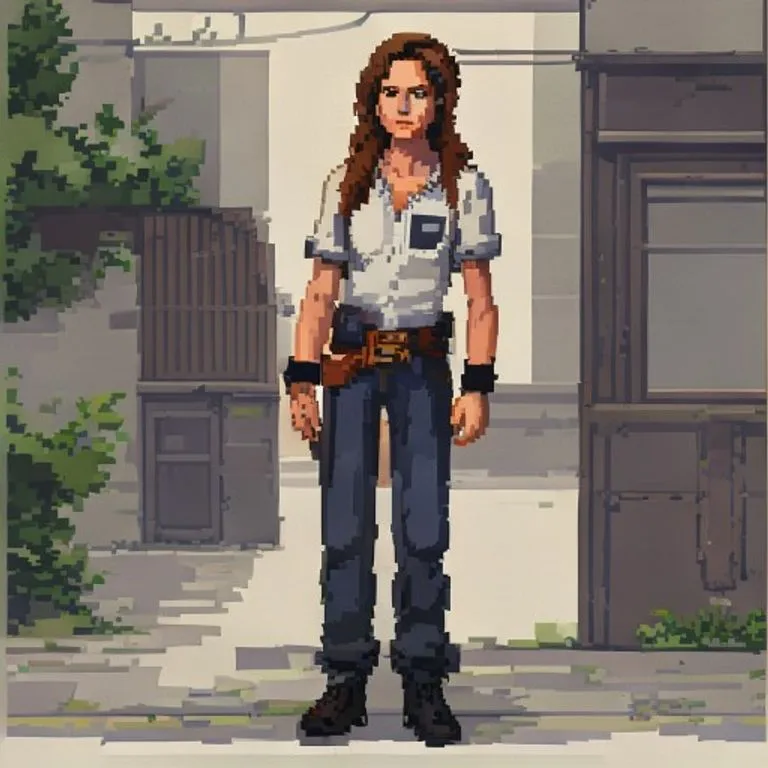
Effetto Pixel Art JRPG
Trasforma la tua foto in una scena pixel art in stile JRPG anni '90 preservando posa, outfit e illuminazione.
@pixelcraft11 luglio 2026756 Mi piace112 commenti
Prompt
Use the uploaded photo as the reference image. Convert the entire image into a clean JRPG-style pixel-art scene.

Preserve the original subject, pose, outfit, hairstyle, facial expression, skin tone, body proportions, props, background, camera angle, framing, perspective, lighting direction, color temperature, and overall scene layout. Do not redesign the scene or add new objects.

Render it like a late-1990s / early-2000s 2D pixel-art game background with a character sprite integrated into the environment. The style should feel like an urban slice-of-life JRPG, visual novel background, or early console story-game cutscene.

Keep the original photo's lighting mood and color relationships. Do not shift the image warmer, darker, more orange, more brown, more sepia, or more cinematic. Preserve natural skin color, original clothing colors, original shadow direction, and the overall white balance from the reference photo.

Use clean hand-pixeled rendering, muted but accurate colors, simple readable forms, crisp outlines, controlled pixel clusters, subtle dithering, and soft blocky shadows.

The character should look like a natural semi-realistic anime/JRPG pixel character, not chibi and not overly cute. Preserve the person's recognizable hairstyle, outfit, pose, proportions, expression, skin tone, and facial structure, simplified into pixel-art form.

The environment should stay faithful to the reference photo, only translated into pixel art. Keep vehicles, walls, streets, buildings, interiors, landscapes, furniture, objects, and background elements in their original positions when present. Simplify details into clean pixel shapes rather than adding extra decoration.

The final result should look like a real 2D game screenshot or cutscene from a grounded retro JRPG, not a pixel filter, not a poster illustration, and not modern digital art.

Negative prompt: changed skin tone, orange skin, tan skin shift, sepia filter, orange/brown color grade, warm color shift, golden lighting, darker lighting, cinematic glow, simple pixel filter, photorealistic pixels, over-detailed poster art, heavy dithering, noisy textures, extra props, extra signs, extra posters, added text, redesigned scene, fantasy background, cozy café aesthetic, chibi character, modern anime painting, smooth digital painting, voxel art, Minecraft style, 3D render, changed pose, changed outfit, changed background, altered identity.
Come usare questo prompt
Il prompt “Effetto Pixel Art JRPG” è un punto di partenza pronto per gemini. Aggiungi il tuo obiettivo e il contesto per ottenere un risultato più pertinente.
- 1Copia il prompt nello strumento di IA scelto.
- 2Sostituisci segnaposto e dettagli generici con le tue informazioni.
- 3Controlla il primo risultato e perfeziona tono, lunghezza o formato.
Prompt correlati
Scopri altri prompt collegati per piattaforma, categoria o tag.
geminiEffetto Anime Disegnato a ManoConverte la tua foto in anime disegnato a mano dettagliato preservando composizione e struttura del viso.geminiEffetto Anime Anni '90Trasforma la tua foto nell'estetica anime anni '90: stile di disegno d'epoca, colori e un'aria da personaggio ribelle.geminiEffetto Schermata di Caricamento GTA VITrasforma la tua foto in un'illustrazione in stile artwork promozionale GTA VI / Vice City: contorni netti, cel shading e colori vivaci.geminiScreenshot In-Game di GTA VRicostruisce la tua foto come un autentico render 3D in-game di GTA V — non un filtro, una ricostruzione poligonale completa.geminiEffetto Minifigure LEGOTrasforma le persone nella tua foto in autentiche minifigure LEGO, ricostruendo la scena come un diorama LEGO realistico.geminiEffetto Miglioramento 4KRende la tua foto più nitida, dettagliata e di qualità superiore senza cambiare nulla; recupera i dettagli dalle immagini compresse.
#art#anime#photo-edit
Crea il tuo prompt
Genera gratuitamente prompt ottimizzati per ChatGPT, Claude, Gemini e oltre 50 piattaforme.
Inizia gratis