gemini
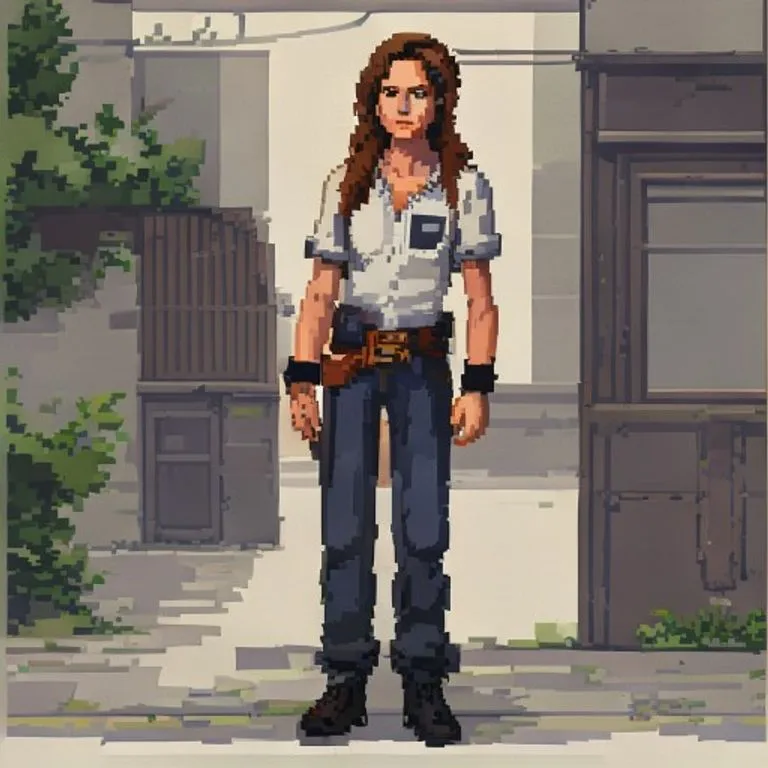
Эффект пиксель-арта JRPG
Превращает ваше фото в чистую пиксель-арт сцену в стиле JRPG 90-х, сохраняя позу, одежду и освещение.
@pixelcraft11 июля 2026 г.756 отметок112 комментариев
Prompt
Use the uploaded photo as the reference image. Convert the entire image into a clean JRPG-style pixel-art scene.

Preserve the original subject, pose, outfit, hairstyle, facial expression, skin tone, body proportions, props, background, camera angle, framing, perspective, lighting direction, color temperature, and overall scene layout. Do not redesign the scene or add new objects.

Render it like a late-1990s / early-2000s 2D pixel-art game background with a character sprite integrated into the environment. The style should feel like an urban slice-of-life JRPG, visual novel background, or early console story-game cutscene.

Keep the original photo's lighting mood and color relationships. Do not shift the image warmer, darker, more orange, more brown, more sepia, or more cinematic. Preserve natural skin color, original clothing colors, original shadow direction, and the overall white balance from the reference photo.

Use clean hand-pixeled rendering, muted but accurate colors, simple readable forms, crisp outlines, controlled pixel clusters, subtle dithering, and soft blocky shadows.

The character should look like a natural semi-realistic anime/JRPG pixel character, not chibi and not overly cute. Preserve the person's recognizable hairstyle, outfit, pose, proportions, expression, skin tone, and facial structure, simplified into pixel-art form.

The environment should stay faithful to the reference photo, only translated into pixel art. Keep vehicles, walls, streets, buildings, interiors, landscapes, furniture, objects, and background elements in their original positions when present. Simplify details into clean pixel shapes rather than adding extra decoration.

The final result should look like a real 2D game screenshot or cutscene from a grounded retro JRPG, not a pixel filter, not a poster illustration, and not modern digital art.

Negative prompt: changed skin tone, orange skin, tan skin shift, sepia filter, orange/brown color grade, warm color shift, golden lighting, darker lighting, cinematic glow, simple pixel filter, photorealistic pixels, over-detailed poster art, heavy dithering, noisy textures, extra props, extra signs, extra posters, added text, redesigned scene, fantasy background, cozy café aesthetic, chibi character, modern anime painting, smooth digital painting, voxel art, Minecraft style, 3D render, changed pose, changed outfit, changed background, altered identity.
Как использовать этот промпт
Промпт «Эффект пиксель-арта JRPG» — готовая основа для gemini. Добавьте свою цель и контекст для более точного результа.
- 1Скопируйте промпт в выбранный ИИ-инструмент.
- 2Замените маркеры и общие детали своими данными.
- 3Проверьте первый результат и уточните тон, длину или формат.
Похожие промпты
Другие промпты со схожими платформами, категориями или тегами.
geminiЭффект рисованного анимеПревращает фото в детальное рисованное аниме, сохраняя композицию и черты лица.geminiЭффект аниме 90-хПревращает ваше фото в эстетику аниме 90-х: стиль рисовки той эпохи, цвета и дерзкий характер персонажа.geminiЭффект загрузочного экрана GTA VIПревращает фото в иллюстрацию в стиле промо-арта GTA VI / Vice City: жирные контуры, cel shading и яркие цвета.geminiСкриншот из GTA VПересоздаёт фото как настоящий внутриигровой 3D-рендер GTA V — не фильтр, а полная полигональная реконструкция.geminiЭффект LEGO-минифигуркиПревращает людей на фото в аутентичные LEGO-минифигурки, воссоздавая сцену как реалистичную LEGO-диораму.geminiЭффект улучшения до 4KДелает фото чётче, детальнее и качественнее, ничего не меняя; восстанавливает детали сжатых изображений.
#art#anime#photo-edit
Создайте свой промпт
Бесплатно создавайте промпты для ChatGPT, Claude, Gemini и других платформ.
Начать бесплатно