gemini
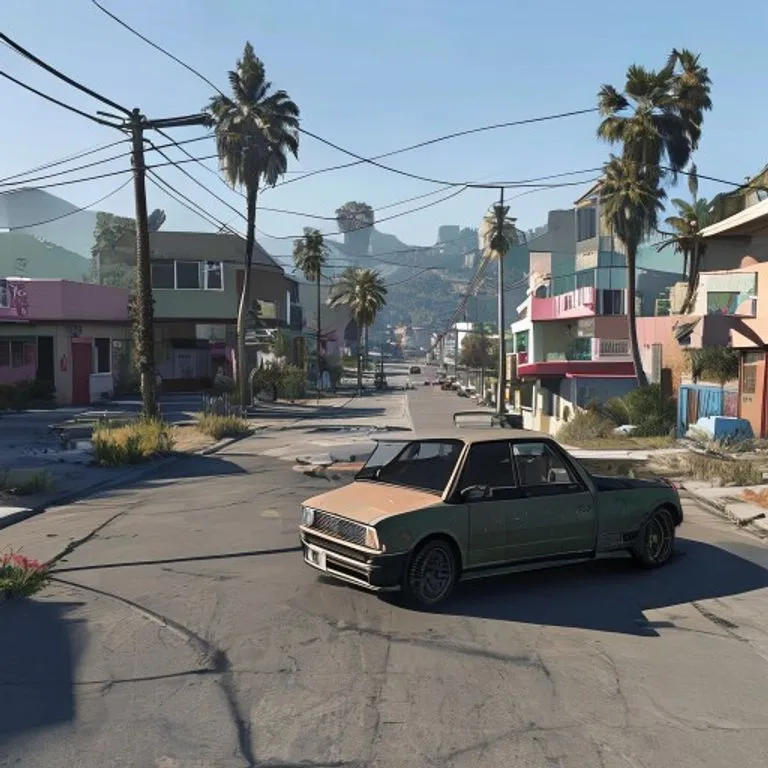
GTA-V-In-Game-Screenshot
Baut dein Foto als authentischen GTA-V-In-Game-3D-Render nach — kein Filter, sondern eine vollständige polygonale Rekonstruktion.
@lossantos11. Juli 2026936 Likes142 Kommentare
Prompt
Rebuild the entire scene from the reference image as a real-time 3D render inside the GTA V Rage engine. Do not apply a filter. Fully reconstruct all people, vehicles, architecture, terrain, and props as polygonal 3D assets native to GTA V. The result should look like an authentic in-game screenshot captured on a high-end PC, ultra settings enabled.

All subjects must be converted into clearly modeled geometry with visible polygon structure, baked normal maps, and game-ready textures. Faces, bodies, and clothing should follow GTA V character proportions and anatomy, slightly exaggerated, rigid, and digitally sculpted. Skin is matte and textured, no photographic pores. Hair is clumped, card-based, slightly stiff. Clothing uses flat fabric shaders with visible seams and texture repetition.

Environment must feel like Los Santos or Blaine County logic. Buildings are modular, edges slightly sharp, surfaces tiled and optimized. Roads, sidewalks, vegetation, street props, and background elements are simplified but dense, clearly game-built. No real-world photographic depth or lens artifacts.

Lighting follows GTA V real-time lighting behavior: strong directional sunlight or overcast skylight depending on scene, hard shadows with defined edges, subtle ambient occlusion in corners. Reflections are screen-space and imperfect. Colors are slightly saturated with the recognizable GTA V color grading. Contrast is controlled but punchy.

Materials must read as video game assets: asphalt flat and grainy, metal with simple specular highlights, glass clean with limited reflection depth, vegetation slightly stiff and stylized. Nothing should appear physically accurate or cinematic-render realistic.

Camera should feel like a gameplay or Rockstar Editor capture: third-person or free camera perspective, slight wide-angle distortion, stable framing, no depth of field blur, no motion blur unless minimal and engine-based. Overall look is unmistakably GTA V: real-time 3D, polygon, textured, optimized, stylized realism, clearly not a photograph.
So verwendest du diesen Prompt
Der Prompt „GTA-V-In-Game-Screenshot“ ist ein fertiger Ausgangspunkt für gemini. Ergänze dein Ziel und deinen Kontext, um passendere Ergebnisse zu erhalten.
- 1Prompt kopieren und in das gewünschte KI-Tool einfügen.
- 2Platzhalter und allgemeine Angaben durch eigene Informationen ersetzen.
- 3Erstes Ergebnis prüfen und Ton, Länge oder Format weiter verfeinern.
Ähnliche Prompts
Weitere Prompts mit verwandten Plattformen, Kategorien oder Tags.
geminiGTA-VI-Ladebildschirm-EffektVerwandelt dein Foto in eine Illustration im GTA-VI/Vice-City-Promo-Stil: kräftige Konturen, Cel-Shading und lebendige Farben.geminiLEGO-Minifigur-EffektVerwandelt Personen auf deinem Foto in authentische LEGO-Minifiguren und baut die Szene als realistisches LEGO-Diorama nach.geminiMinecraft-Welt-EffektDu bleibst fotorealistisch, während der Hintergrund als exakte Minecraft-Voxelwelt nachgebaut wird; optional mit Namensschild und Spiel-UI.geminiMinecraft-Essen-EffektVerwandelt nur Essen und Getränke auf deinem Foto in Minecraft-Voxelblöcke, während Menschen und Umgebung realistisch bleiben.geminiÖlgemälde-EffektVerwandelt dein Foto in ein kunstvolles Ölgemälde und bewahrt dabei Komposition, Winkel, Licht und Farben.chatgptBehind-the-Scenes-AufnahmeErstellt ein realistisches Set-Foto aus deinem Lieblingsfilm: mit Crew, Tonangel und Set-Chaos.
#art#creative#photo-edit
Eigenen Prompt erstellen
Erstelle kostenlos optimierte Prompts für ChatGPT, Claude, Gemini und mehr als 50 Plattformen.
Kostenlos starten