gemini
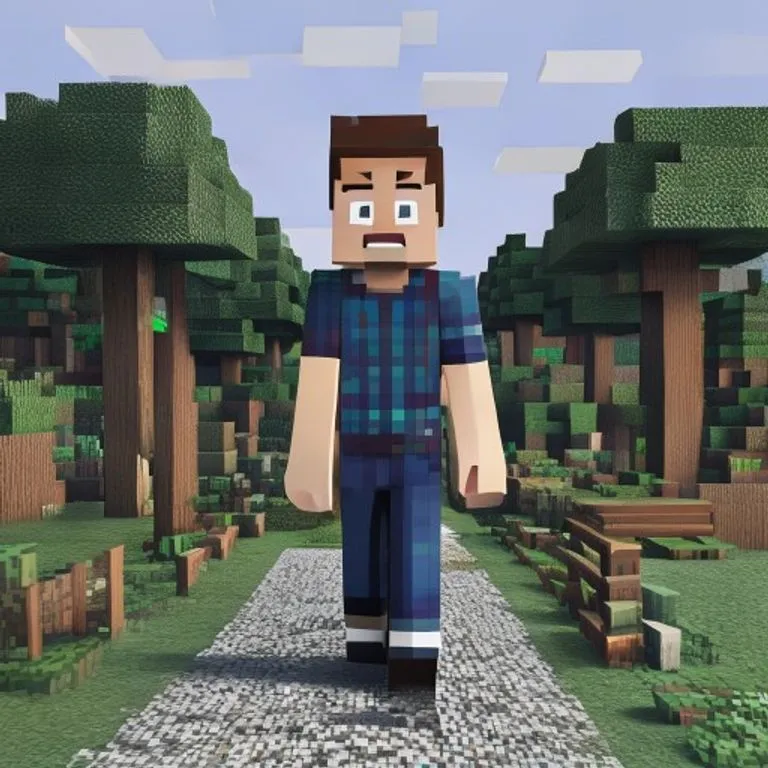
Effet Monde Minecraft
Vous restez photoréaliste tandis que l'arrière-plan devient un monde voxel Minecraft fidèle ; pseudo et interface de jeu en option.
@voxelworld11 juillet 2026867 mentions J’aime134 commentaires
Prompt
Keep the human subject 100 percent photorealistic and untouched. No pixel filter, no stylization, no lighting remap on skin. Preserve exact facial detail, pores, fabric weave, hair strands, natural shadows. Expression and posture remain identical.

Rebuild the background as a structurally accurate Minecraft voxel replica of the original location. Do not reinterpret. Match the exact layout, spacing, depth, and geometry from the reference image. If there is a path, replicate its exact curve and width using gravel or dirt blocks. If there are trees, match trunk positions, height ratios, canopy spread using appropriate log and leaf blocks. If there are buildings, recreate their silhouette, window placement, roof angle using Minecraft block geometry. If there are rocks, benches, fences, signs, convert them into block equivalents but maintain their exact position and proportion relative to the subject.

Perspective must match the original photo perfectly. Horizon line, camera height, focal distance, framing, subject scale all identical. Any object physically touching the subject must convert into Minecraft logic.

Optional (nametag): Add the name [NAME] floating directly above the human subject's head like a Minecraft in-game player name tag. Place the name in a small white pixel font centered above the head, inside a subtle semi-transparent dark charcoal rectangle with soft edges and a faint black drop shadow. Keep it clean, readable, and naturally integrated into the scene. Do not make it too large, do not cover the face, and do not add any other text.

Optional (game UI): Add subtle Minecraft UI near the edges, such as a small achievement pop-up, tiny hearts, hunger bar, hotbar, or inventory-style icon. Keep the UI minimal, clean, and naturally integrated. Do not cover the subject.
Comment utiliser ce prompt
Le prompt « Effet Monde Minecraft » est un point de départ prêt à l’emploi pour gemini. Ajoutez votre objectif et votre contexte pour obtenir un résultat plus pertinent.
- 1Copiez le prompt dans l’outil IA de votre choix.
- 2Remplacez les champs génériques et les variables par vos informations.
- 3Examinez le premier résultat puis précisez le ton, la longueur ou le format.
Prompts associés
Découvrez d’autres prompts liés par plateforme, catégorie ou mot-clé.
geminiEffet Écran de Chargement GTA VITransforme votre photo en illustration style artwork promo GTA VI / Vice City : contours marqués, cel shading et couleurs vives.geminiCapture d'Écran GTA V In-GameReconstruit votre photo comme un authentique rendu 3D in-game de GTA V — pas un filtre, une reconstruction polygonale complète.geminiEffet Minifigurine LEGOTransforme les personnes de votre photo en authentiques minifigurines LEGO et reconstruit la scène en diorama LEGO réaliste.geminiEffet Nourriture MinecraftConvertit uniquement la nourriture et les boissons de votre photo en blocs voxel Minecraft, les personnes et le décor restant réalistes.geminiEffet Peinture à l'HuileTransforme votre photo en peinture à l'huile d'art tout en préservant composition, angle, lumière et couleurs.chatgptPhoto de Coulisses de TournageCrée une photo réaliste des coulisses de votre film préféré : équipe, perche micro et chaos de plateau inclus.
#art#creative#photo-edit
Créez votre propre prompt
Générez gratuitement des prompts optimisés pour ChatGPT, Claude, Gemini et plus de 50 plateformes.
Commencer gratuitement