gemini
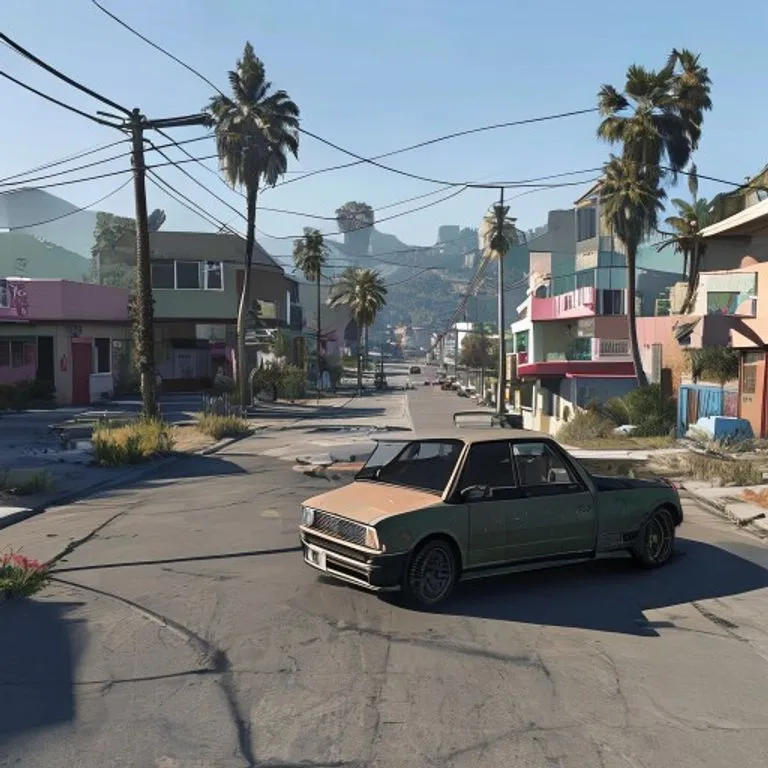
Capture d'Écran GTA V In-Game
Reconstruit votre photo comme un authentique rendu 3D in-game de GTA V — pas un filtre, une reconstruction polygonale complète.
@lossantos11 juillet 2026936 mentions J’aime142 commentaires
Prompt
Rebuild the entire scene from the reference image as a real-time 3D render inside the GTA V Rage engine. Do not apply a filter. Fully reconstruct all people, vehicles, architecture, terrain, and props as polygonal 3D assets native to GTA V. The result should look like an authentic in-game screenshot captured on a high-end PC, ultra settings enabled.

All subjects must be converted into clearly modeled geometry with visible polygon structure, baked normal maps, and game-ready textures. Faces, bodies, and clothing should follow GTA V character proportions and anatomy, slightly exaggerated, rigid, and digitally sculpted. Skin is matte and textured, no photographic pores. Hair is clumped, card-based, slightly stiff. Clothing uses flat fabric shaders with visible seams and texture repetition.

Environment must feel like Los Santos or Blaine County logic. Buildings are modular, edges slightly sharp, surfaces tiled and optimized. Roads, sidewalks, vegetation, street props, and background elements are simplified but dense, clearly game-built. No real-world photographic depth or lens artifacts.

Lighting follows GTA V real-time lighting behavior: strong directional sunlight or overcast skylight depending on scene, hard shadows with defined edges, subtle ambient occlusion in corners. Reflections are screen-space and imperfect. Colors are slightly saturated with the recognizable GTA V color grading. Contrast is controlled but punchy.

Materials must read as video game assets: asphalt flat and grainy, metal with simple specular highlights, glass clean with limited reflection depth, vegetation slightly stiff and stylized. Nothing should appear physically accurate or cinematic-render realistic.

Camera should feel like a gameplay or Rockstar Editor capture: third-person or free camera perspective, slight wide-angle distortion, stable framing, no depth of field blur, no motion blur unless minimal and engine-based. Overall look is unmistakably GTA V: real-time 3D, polygon, textured, optimized, stylized realism, clearly not a photograph.
Comment utiliser ce prompt
Le prompt « Capture d'Écran GTA V In-Game » est un point de départ prêt à l’emploi pour gemini. Ajoutez votre objectif et votre contexte pour obtenir un résultat plus pertinent.
- 1Copiez le prompt dans l’outil IA de votre choix.
- 2Remplacez les champs génériques et les variables par vos informations.
- 3Examinez le premier résultat puis précisez le ton, la longueur ou le format.
Prompts associés
Découvrez d’autres prompts liés par plateforme, catégorie ou mot-clé.
geminiEffet Écran de Chargement GTA VITransforme votre photo en illustration style artwork promo GTA VI / Vice City : contours marqués, cel shading et couleurs vives.geminiEffet Minifigurine LEGOTransforme les personnes de votre photo en authentiques minifigurines LEGO et reconstruit la scène en diorama LEGO réaliste.geminiEffet Monde MinecraftVous restez photoréaliste tandis que l'arrière-plan devient un monde voxel Minecraft fidèle ; pseudo et interface de jeu en option.geminiEffet Nourriture MinecraftConvertit uniquement la nourriture et les boissons de votre photo en blocs voxel Minecraft, les personnes et le décor restant réalistes.geminiEffet Peinture à l'HuileTransforme votre photo en peinture à l'huile d'art tout en préservant composition, angle, lumière et couleurs.chatgptPhoto de Coulisses de TournageCrée une photo réaliste des coulisses de votre film préféré : équipe, perche micro et chaos de plateau inclus.
#art#creative#photo-edit
Créez votre propre prompt
Générez gratuitement des prompts optimisés pour ChatGPT, Claude, Gemini et plus de 50 plateformes.
Commencer gratuitement