gemini
JRPGピクセルアートエフェクト
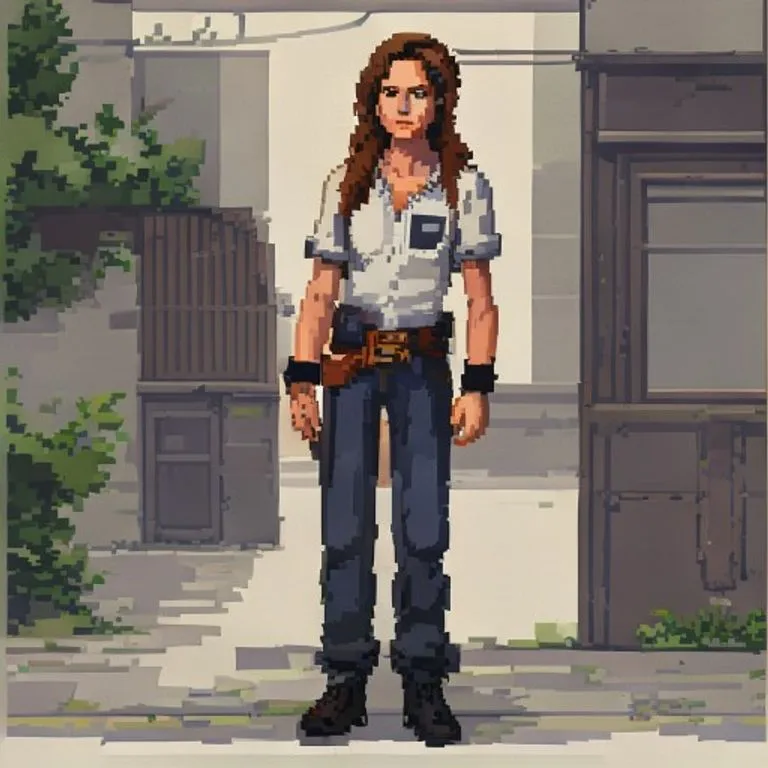
写真を90年代JRPG風の美しいピクセルアートシーンに変換。ポーズ・服装・ライティングを維持します。
@pixelcraft2026年7月11日756 いいね112 コメント
Prompt
Use the uploaded photo as the reference image. Convert the entire image into a clean JRPG-style pixel-art scene.

Preserve the original subject, pose, outfit, hairstyle, facial expression, skin tone, body proportions, props, background, camera angle, framing, perspective, lighting direction, color temperature, and overall scene layout. Do not redesign the scene or add new objects.

Render it like a late-1990s / early-2000s 2D pixel-art game background with a character sprite integrated into the environment. The style should feel like an urban slice-of-life JRPG, visual novel background, or early console story-game cutscene.

Keep the original photo's lighting mood and color relationships. Do not shift the image warmer, darker, more orange, more brown, more sepia, or more cinematic. Preserve natural skin color, original clothing colors, original shadow direction, and the overall white balance from the reference photo.

Use clean hand-pixeled rendering, muted but accurate colors, simple readable forms, crisp outlines, controlled pixel clusters, subtle dithering, and soft blocky shadows.

The character should look like a natural semi-realistic anime/JRPG pixel character, not chibi and not overly cute. Preserve the person's recognizable hairstyle, outfit, pose, proportions, expression, skin tone, and facial structure, simplified into pixel-art form.

The environment should stay faithful to the reference photo, only translated into pixel art. Keep vehicles, walls, streets, buildings, interiors, landscapes, furniture, objects, and background elements in their original positions when present. Simplify details into clean pixel shapes rather than adding extra decoration.

The final result should look like a real 2D game screenshot or cutscene from a grounded retro JRPG, not a pixel filter, not a poster illustration, and not modern digital art.

Negative prompt: changed skin tone, orange skin, tan skin shift, sepia filter, orange/brown color grade, warm color shift, golden lighting, darker lighting, cinematic glow, simple pixel filter, photorealistic pixels, over-detailed poster art, heavy dithering, noisy textures, extra props, extra signs, extra posters, added text, redesigned scene, fantasy background, cozy café aesthetic, chibi character, modern anime painting, smooth digital painting, voxel art, Minecraft style, 3D render, changed pose, changed outfit, changed background, altered identity.
このプロンプトの使い方
「JRPGピクセルアートエフェクト」はgemini向けのすぐに使えるプロンプトです。目的や背景を追加すると、より適切な結果が得られます。
- 1プロンプトをコピーし、対象のAIツールに貼り付けます。
- 2プレースホルダーや一般的な内容を自分の情報に置き換えます。
- 3最初の結果を確認し、トーン、長さ、形式を調整します。
関連プロンプト
プラットフォーム、カテゴリ、タグが関連するプロンプトを探せます。
gemini手描きアニメエフェクト構図と顔立ちを保ったまま、写真を精細な手描きアニメスタイルに変換します。gemini90年代アニメエフェクト写真を90年代アニメの美学に変換:当時の作画スタイルと色使い、反骨精神のあるキャラクターの雰囲気で。geminiGTA VIローディング画面エフェクト写真をGTA VI / Vice Cityのプロモアート風イラストに変換:太い輪郭線、セルシェーディング、鮮やかな色彩。geminiGTA Vゲーム内スクリーンショット写真をフィルターではなく、本物のGTA Vゲーム内3Dレンダーとしてポリゴンで完全再構築します。geminiLEGOミニフィグエフェクト写真の人物を本物のLEGOミニフィギュアに変換し、シーンをリアルなLEGOジオラマとして再構築します。gemini4Kエンハンスエフェクト何も変えずに写真をよりシャープで高精細・高品質に。圧縮画像のディテールも復元します。
#art#anime#photo-edit