gemini
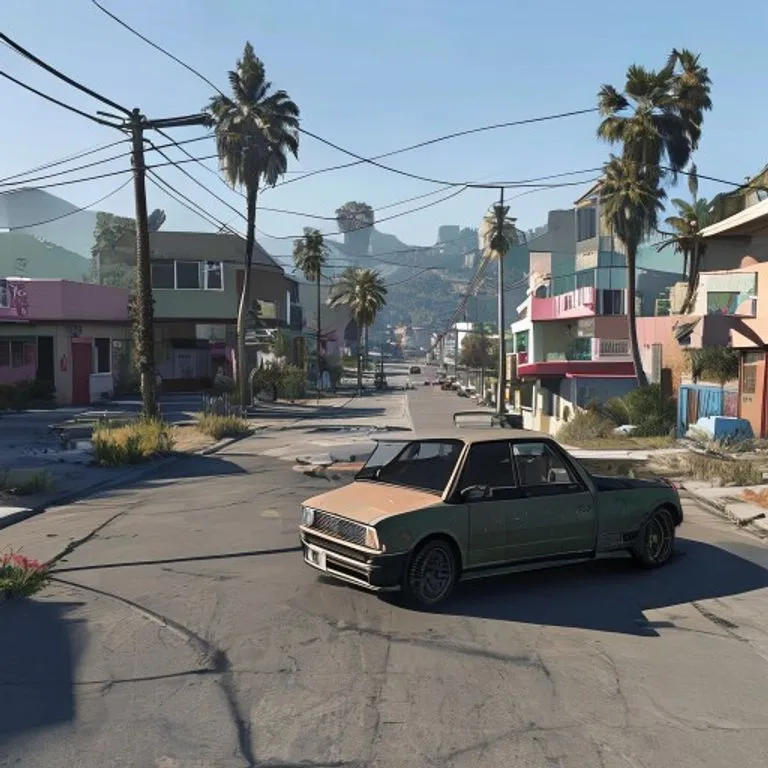
GTA Vゲーム内スクリーンショット
写真をフィルターではなく、本物のGTA Vゲーム内3Dレンダーとしてポリゴンで完全再構築します。
@lossantos2026年7月11日936 いいね142 コメント
Prompt
Rebuild the entire scene from the reference image as a real-time 3D render inside the GTA V Rage engine. Do not apply a filter. Fully reconstruct all people, vehicles, architecture, terrain, and props as polygonal 3D assets native to GTA V. The result should look like an authentic in-game screenshot captured on a high-end PC, ultra settings enabled.

All subjects must be converted into clearly modeled geometry with visible polygon structure, baked normal maps, and game-ready textures. Faces, bodies, and clothing should follow GTA V character proportions and anatomy, slightly exaggerated, rigid, and digitally sculpted. Skin is matte and textured, no photographic pores. Hair is clumped, card-based, slightly stiff. Clothing uses flat fabric shaders with visible seams and texture repetition.

Environment must feel like Los Santos or Blaine County logic. Buildings are modular, edges slightly sharp, surfaces tiled and optimized. Roads, sidewalks, vegetation, street props, and background elements are simplified but dense, clearly game-built. No real-world photographic depth or lens artifacts.

Lighting follows GTA V real-time lighting behavior: strong directional sunlight or overcast skylight depending on scene, hard shadows with defined edges, subtle ambient occlusion in corners. Reflections are screen-space and imperfect. Colors are slightly saturated with the recognizable GTA V color grading. Contrast is controlled but punchy.

Materials must read as video game assets: asphalt flat and grainy, metal with simple specular highlights, glass clean with limited reflection depth, vegetation slightly stiff and stylized. Nothing should appear physically accurate or cinematic-render realistic.

Camera should feel like a gameplay or Rockstar Editor capture: third-person or free camera perspective, slight wide-angle distortion, stable framing, no depth of field blur, no motion blur unless minimal and engine-based. Overall look is unmistakably GTA V: real-time 3D, polygon, textured, optimized, stylized realism, clearly not a photograph.
このプロンプトの使い方
「GTA Vゲーム内スクリーンショット」はgemini向けのすぐに使えるプロンプトです。目的や背景を追加すると、より適切な結果が得られます。
- 1プロンプトをコピーし、対象のAIツールに貼り付けます。
- 2プレースホルダーや一般的な内容を自分の情報に置き換えます。
- 3最初の結果を確認し、トーン、長さ、形式を調整します。
関連プロンプト
プラットフォーム、カテゴリ、タグが関連するプロンプトを探せます。
geminiGTA VIローディング画面エフェクト写真をGTA VI / Vice Cityのプロモアート風イラストに変換:太い輪郭線、セルシェーディング、鮮やかな色彩。geminiLEGOミニフィグエフェクト写真の人物を本物のLEGOミニフィギュアに変換し、シーンをリアルなLEGOジオラマとして再構築します。geminiマインクラフトワールドエフェクト人物はフォトリアルのまま、背景を忠実なマインクラフトのボクセル世界に再構築。ネームタグやゲームUIもオプションで追加可能。geminiマインクラフトフードエフェクト写真の中の食べ物と飲み物だけをマインクラフトのボクセルに変換。人物と背景はリアルなまま維持します。gemini油絵エフェクト構図・アングル・光・色を保ったまま、写真を巨匠が描いたような本格的な油絵に変換します。chatgpt映画メイキングショット好きな映画の撮影現場のリアルな舞台裏写真を生成:スタッフ、ブームマイク、現場の混沌も込みで。
#art#creative#photo-edit