gemini
JRPG Pixel Art Effect
Turns your photo into a clean 90s JRPG-style pixel-art scene while preserving pose, outfit and lighting.
@pixelcraftJuly 11, 2026756 likes112 comments
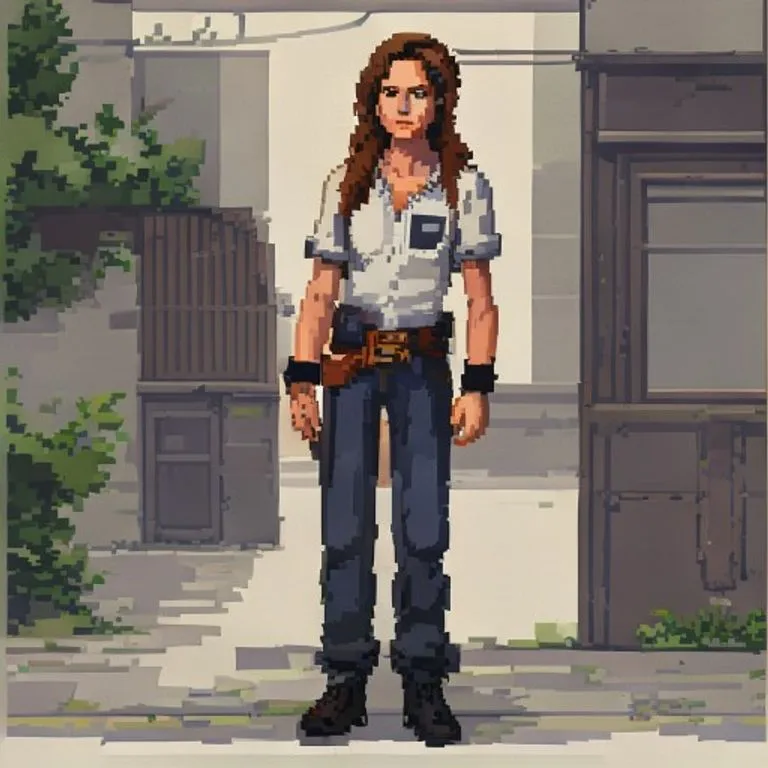
Prompt
Use the uploaded photo as the reference image. Convert the entire image into a clean JRPG-style pixel-art scene.

Preserve the original subject, pose, outfit, hairstyle, facial expression, skin tone, body proportions, props, background, camera angle, framing, perspective, lighting direction, color temperature, and overall scene layout. Do not redesign the scene or add new objects.

Render it like a late-1990s / early-2000s 2D pixel-art game background with a character sprite integrated into the environment. The style should feel like an urban slice-of-life JRPG, visual novel background, or early console story-game cutscene.

Keep the original photo's lighting mood and color relationships. Do not shift the image warmer, darker, more orange, more brown, more sepia, or more cinematic. Preserve natural skin color, original clothing colors, original shadow direction, and the overall white balance from the reference photo.

Use clean hand-pixeled rendering, muted but accurate colors, simple readable forms, crisp outlines, controlled pixel clusters, subtle dithering, and soft blocky shadows.

The character should look like a natural semi-realistic anime/JRPG pixel character, not chibi and not overly cute. Preserve the person's recognizable hairstyle, outfit, pose, proportions, expression, skin tone, and facial structure, simplified into pixel-art form.

The environment should stay faithful to the reference photo, only translated into pixel art. Keep vehicles, walls, streets, buildings, interiors, landscapes, furniture, objects, and background elements in their original positions when present. Simplify details into clean pixel shapes rather than adding extra decoration.

The final result should look like a real 2D game screenshot or cutscene from a grounded retro JRPG, not a pixel filter, not a poster illustration, and not modern digital art.

Negative prompt: changed skin tone, orange skin, tan skin shift, sepia filter, orange/brown color grade, warm color shift, golden lighting, darker lighting, cinematic glow, simple pixel filter, photorealistic pixels, over-detailed poster art, heavy dithering, noisy textures, extra props, extra signs, extra posters, added text, redesigned scene, fantasy background, cozy café aesthetic, chibi character, modern anime painting, smooth digital painting, voxel art, Minecraft style, 3D render, changed pose, changed outfit, changed background, altered identity.
How to use this prompt
The “JRPG Pixel Art Effect” prompt is a ready-made starting point for gemini. Add your own goal and context to make the result more relevant.
- 1Copy the prompt and paste it into the target AI tool.
- 2Replace bracketed placeholders and generic details with your own information.
- 3Review the first result, then refine the tone, length, or output format.
Related prompts
Explore more ready-made prompts with related platforms, categories, or tags.
geminiHand-Drawn Anime EffectConverts your photo into detailed hand-drawn anime while preserving composition and facial structure.gemini90s Anime EffectTransforms your photo into 90s anime aesthetics: era-accurate art style, colors and a rebellious character vibe.chatgptAnime PosterRedesigns the subject into a stylized realistic anime-techwear character standing back-to-back with a famous anime character. Excellent for customized gaming content and posters.geminiGTA VI Loading Screen EffectTurns your photo into GTA VI / Vice City promotional-art style illustration: bold outlines, cel shading and vibrant colors.geminiGTA V In-Game ScreenshotRebuilds your photo as an authentic GTA V in-game 3D render — not a filter, a full polygonal reconstruction.geminiLEGO Minifigure EffectTransforms people in your photo into authentic LEGO minifigures, rebuilding the scene as a realistic LEGO diorama.
#art#anime#photo-edit
Create your own prompt
Generate free optimized prompts for ChatGPT, Claude, Gemini and 50+ platforms.
Start for Free