gemini
GTA VI Loading Screen Effect
Turns your photo into GTA VI / Vice City promotional-art style illustration: bold outlines, cel shading and vibrant colors.
@vicecityartJuly 11, 20261043 likes168 comments
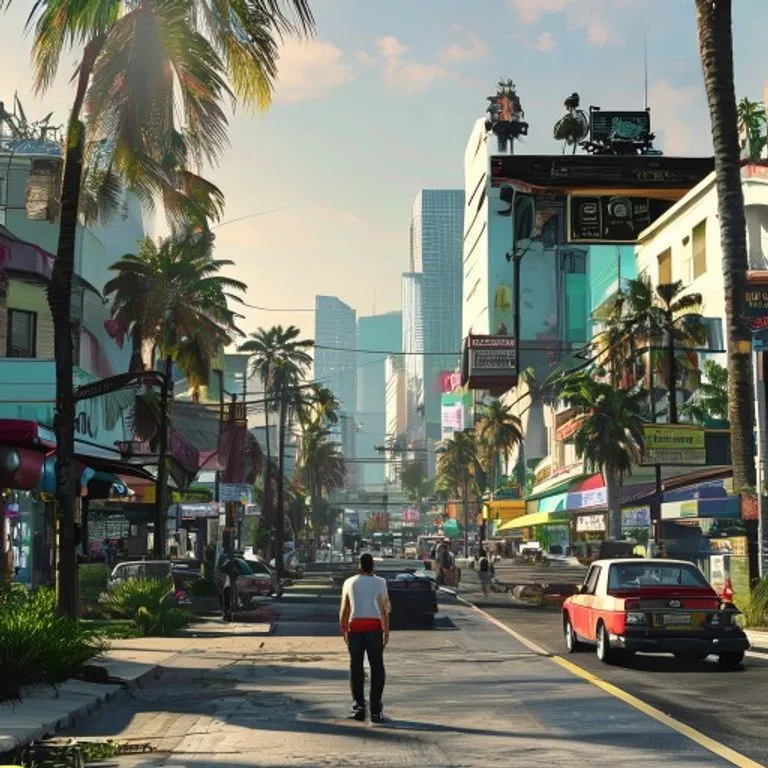
Prompt
Transform the uploaded image into a high-end commercial illustration inspired by the promotional loading screen artwork of Grand Theft Auto VI and Grand Theft Auto: Vice City.

Preserve the exact identity, pose, facial features, clothing, accessories, hairstyle, camera angle, and overall composition of the original photo.

Reimagine the existing background rather than replacing it. Keep the original location immediately recognizable by preserving its layout, perspective, architecture, streets, natural features, landmarks, and overall atmosphere. Reinterpret the environment as if it exists naturally within the world of Grand Theft Auto VI's Vice City, enhancing it with richer visual storytelling, more stylized architecture, cinematic lighting, refined environmental details, vibrant colors, subtle signage, atmospheric depth, and immersive world-building while respecting the purpose and character of the original location.

Adapt environmental elements contextually. Add vehicles, pedestrians, storefronts, vegetation, palm trees, street furniture, neon lighting, luxury details, or urban activity only where they naturally belong. Preserve the function, scale, and mood of the original setting. If the original scene is residential, rural, industrial, mountainous, indoors, quiet, or otherwise unsuited to traffic or crowds, do not introduce unnecessary cars, palm trees, pedestrians, or city elements. Every environmental addition should feel like a believable evolution of the original scene rather than a replacement.

Illustrate the image using the signature promotional art style of Grand Theft Auto VI and Grand Theft Auto: Vice City. Use bold black contour lines, crisp vector-inspired shapes, simplified facial features, clean cel shading with two to four shadow values, subtle gradient highlights, high contrast, and vibrant color blocking. Characters should remain instantly recognizable while being slightly stylized. The foreground should be sharp and visually dominant, while the background is simplified into larger graphic shapes with reduced detail, creating depth and emphasizing the subjects.

Use dramatic golden-hour or neon-infused lighting where appropriate, preserving the original time of day whenever possible. Apply strong rim lighting, cinematic shadows, rich atmospheric depth, and the polished commercial illustration aesthetic associated with GTA promotional artwork.

The final artwork should feel like official promotional splash art for a modern open-world action game, capturing the unmistakable visual language of Grand Theft Auto VI and Vice City while remaining an original illustration based entirely on the uploaded photograph.

Avoid: text, logos, loading bars, UI elements, watermarks, anime, manga, painterly brush strokes, oil painting, watercolor, sketch lines, photorealistic textures, excessive surface detail, 3D rendering, generic repeated Vice City backgrounds, forced sports cars, forced palm trees, forced beaches, forced neon hotels, forced city skylines, crowded streets where they do not belong, or any recurring environmental motifs that ignore the original scene. Adapt the environment intelligently and contextually rather than applying the same background to every image.
How to use this prompt
The “GTA VI Loading Screen Effect” prompt is a ready-made starting point for gemini. Add your own goal and context to make the result more relevant.
- 1Copy the prompt and paste it into the target AI tool.
- 2Replace bracketed placeholders and generic details with your own information.
- 3Review the first result, then refine the tone, length, or output format.
Related prompts
Explore more ready-made prompts with related platforms, categories, or tags.
geminiGTA V In-Game ScreenshotRebuilds your photo as an authentic GTA V in-game 3D render — not a filter, a full polygonal reconstruction.geminiLEGO Minifigure EffectTransforms people in your photo into authentic LEGO minifigures, rebuilding the scene as a realistic LEGO diorama.geminiMinecraft World EffectKeeps you photorealistic while rebuilding the background as an accurate Minecraft voxel world; optional nametag and game UI.geminiMinecraft Food EffectConverts only the food and drinks in your photo into Minecraft voxel blocks while people and surroundings stay realistic.geminiOil Painting EffectTransforms your photo into a fine-art oil painting while preserving composition, angle, lighting and colors.chatgptBehind The Scenes ShotCreates a realistic behind-the-scenes photo from your favorite movie set: crew, boom mic and on-set chaos included.
#art#creative#photo-edit
Create your own prompt
Generate free optimized prompts for ChatGPT, Claude, Gemini and 50+ platforms.
Start for Free