gemini
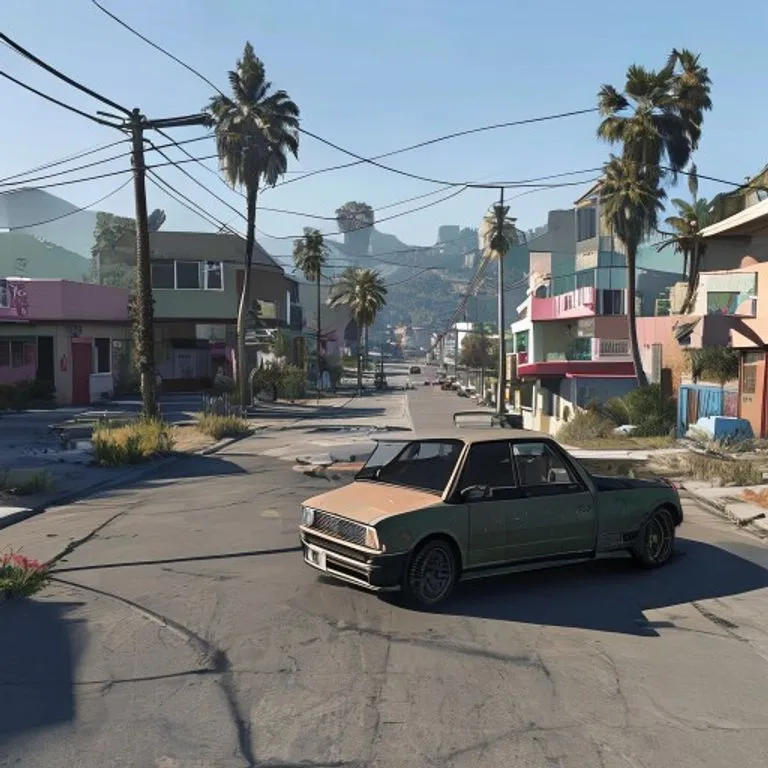
GTA V In-Game Screenshot
Rebuilds your photo as an authentic GTA V in-game 3D render — not a filter, a full polygonal reconstruction.
@lossantosJuly 11, 2026936 likes142 comments
Prompt
Rebuild the entire scene from the reference image as a real-time 3D render inside the GTA V Rage engine. Do not apply a filter. Fully reconstruct all people, vehicles, architecture, terrain, and props as polygonal 3D assets native to GTA V. The result should look like an authentic in-game screenshot captured on a high-end PC, ultra settings enabled.

All subjects must be converted into clearly modeled geometry with visible polygon structure, baked normal maps, and game-ready textures. Faces, bodies, and clothing should follow GTA V character proportions and anatomy, slightly exaggerated, rigid, and digitally sculpted. Skin is matte and textured, no photographic pores. Hair is clumped, card-based, slightly stiff. Clothing uses flat fabric shaders with visible seams and texture repetition.

Environment must feel like Los Santos or Blaine County logic. Buildings are modular, edges slightly sharp, surfaces tiled and optimized. Roads, sidewalks, vegetation, street props, and background elements are simplified but dense, clearly game-built. No real-world photographic depth or lens artifacts.

Lighting follows GTA V real-time lighting behavior: strong directional sunlight or overcast skylight depending on scene, hard shadows with defined edges, subtle ambient occlusion in corners. Reflections are screen-space and imperfect. Colors are slightly saturated with the recognizable GTA V color grading. Contrast is controlled but punchy.

Materials must read as video game assets: asphalt flat and grainy, metal with simple specular highlights, glass clean with limited reflection depth, vegetation slightly stiff and stylized. Nothing should appear physically accurate or cinematic-render realistic.

Camera should feel like a gameplay or Rockstar Editor capture: third-person or free camera perspective, slight wide-angle distortion, stable framing, no depth of field blur, no motion blur unless minimal and engine-based. Overall look is unmistakably GTA V: real-time 3D, polygon, textured, optimized, stylized realism, clearly not a photograph.
How to use this prompt
The “GTA V In-Game Screenshot” prompt is a ready-made starting point for gemini. Add your own goal and context to make the result more relevant.
- 1Copy the prompt and paste it into the target AI tool.
- 2Replace bracketed placeholders and generic details with your own information.
- 3Review the first result, then refine the tone, length, or output format.
Related prompts
Explore more ready-made prompts with related platforms, categories, or tags.
geminiGTA VI Loading Screen EffectTurns your photo into GTA VI / Vice City promotional-art style illustration: bold outlines, cel shading and vibrant colors.geminiLEGO Minifigure EffectTransforms people in your photo into authentic LEGO minifigures, rebuilding the scene as a realistic LEGO diorama.geminiMinecraft World EffectKeeps you photorealistic while rebuilding the background as an accurate Minecraft voxel world; optional nametag and game UI.geminiMinecraft Food EffectConverts only the food and drinks in your photo into Minecraft voxel blocks while people and surroundings stay realistic.geminiOil Painting EffectTransforms your photo into a fine-art oil painting while preserving composition, angle, lighting and colors.chatgptBehind The Scenes ShotCreates a realistic behind-the-scenes photo from your favorite movie set: crew, boom mic and on-set chaos included.
#art#creative#photo-edit
Create your own prompt
Generate free optimized prompts for ChatGPT, Claude, Gemini and 50+ platforms.
Start for Free